Showing posts with label Desktop. Show all posts

Wednesday, November 29, 2023

Google Drive Files Gone Missing Due To a Bug In The Desktop App


Google Drive is one of the best cloud storage options available and is open to the public. However, according to a trending support thread on Google’s support forums, users have reported that some of their files have started to disappear from the service in recent months. Furthermore, since none of these files were deleted manually, they don’t appear in the platform’s recycling bin feature and thus cannot be recovered (so far).

Early on in the investigation, many speculated that the files vanished due to a hacker attack, but this isn’t the case. According to a thorough investigation, it has been concluded that the issue stems from the Google Drive app for desktop, which affects users regardless of whether their system is Windows or Mac. With that said, users on the browser variation of the service can rest easy.


It was also discovered that the bug would eliminate the data from the account, almost reverting the account back to a state before that data was made. Unfortunately, there’s no explanation for it so far, but Google has confirmed that this problem is related to a syncing issue seen in the recently rolled-out v84.0.0.0 through 84.0.4.0 of Drive.


Although this issue affects – as Google puts it – a “limited subset of Drive for desktop users,” it is recommended to backup all important files and documentation. Furthermore, the company has warned users to avoid disconnecting their Google account from the Drive on desktop, and that they should not tamper with the “DriveFS” folder that’s locally found on their machines in any way, shape, or form.

Tuesday, October 5, 2021

YouTube Will Let You Resume Unfinished Mobile Videos On Desktop

YouTube quietly launched a new feature that lets you resume watching videos from your phone to your desktop. “Continue watching” will appear in the form of a mini-player when you pause an unfinished video from your mobile app.

The mini-player will appear on the bottom right corner and will queue the video just a second or so before you paused on the mobile app. You can click the play button to continue watching in the shrunken view or click anywhere on the mini-player itself to expand and open up the video in full.

9to5google reports that the feature works for both Android and iOS, and is even effective when handing off from an Android TV to the desktop site. However, the continuity apparently only works one-way, as the mobile apps cannot resume videos from your computer.

For this to be enabled, both platforms must be logged into the same account in order for the history to be synced. YouTube seems to be trickling out the feature though, as only a handful of people have been able to access it. While you’re waiting for Continue Watching to be released in full, you’ll be happy to know that the premium background playback feature will be coming to all mobile users starting from November.

Saturday, August 21, 2021

Latest SteamVR Beta Allows For Floating Desktop Windows While In-Game

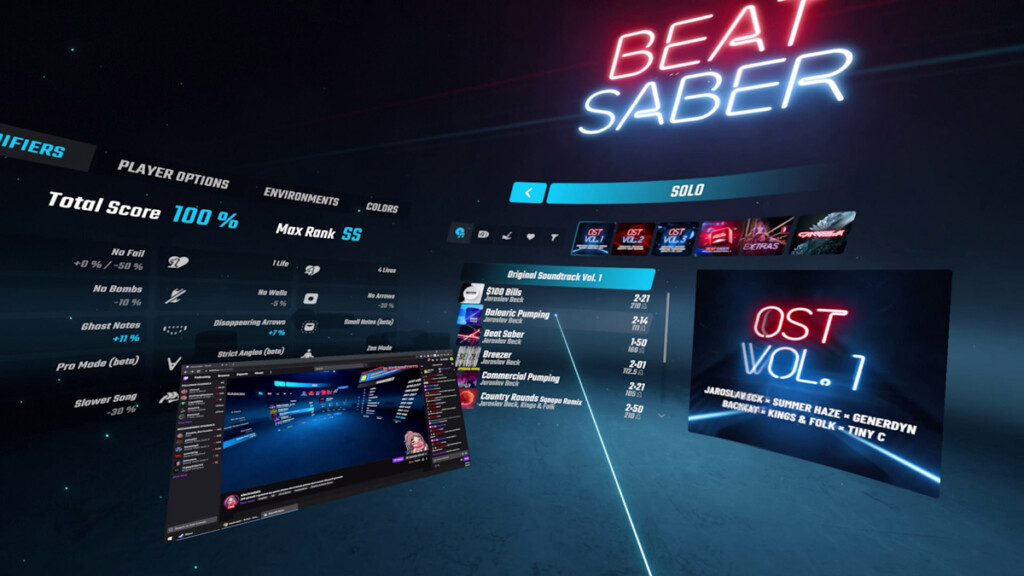
Valve has introduced a neat feature to the latest version of SteamVR, which lets you float windows from your desktop into your virtual space. These windows can be positioned wherever you wish, and would remain there as part of the interface while in-game.

This update is a more flexible approach over the version prior, where users could only bring in a desktop window by attaching them onto your in-game VR controller. The only drawback to this is that you’ll need to lift up your controller in order to glance at the window, which might obstruct your view when playing certain games.

With this new feature, users can simply let a desktop window float anywhere in their virtual space, enabling you to multitask while in a VR game or application. These windows are view-only when you’re in a game or application, and can only be interacted with by pointing at it with your VR controller. On that note, the controller can also be used as a mouse pointer for interaction, such as web browsing or managing content playback via the floating window. Pretty handy, especially if you plan to catch up on a Netflix show while flying a Cessna in Microsoft Flight Simulator – just make sure to keep your plane in the air while doing so.

Although the floating window feature seems like the better alternative, Valve decided to keep the attach-to-controller option just in case. In addition, users can also choose to undock the attached window and position them to float in-game.

To enjoy this new feature, make sure to have your SteamVR beta client updated to version 1.19.6. It’s also worth noting that you can easily opt in to the beta programme by navigating to the app’s Properties window, then to the Betas tab, and choosing SteamVR Beta Update. Upon selecting the option, SteamVR will then download and update to the latest beta version.

Sunday, May 23, 2021

Instagram Reportedly Testing Image Uploads On Desktop


Instagram has allowed users on desktop to peruse their feed via its official website for a long while now. Activities such as posting images to the platform, however, are still exclusive to its app on mobile devices. But according to a recent discovery by developer and leakster Alessandro Paluzzi, this limitation could change in the near future.

The leakster shared a set of images on Twitter, demonstrating the allegedly upcoming upload-from-desktop ability. Paluzzi explained that he discovered the feature while doing some reverse engineering on Instagram’s website.

Upon selecting “New Post”, users will be prompted to a pop-up where they can either drag-and-drop an image or click the “browse from computer” button to select a specific photo from their computer. After uploading, they’ll be greeted to several familiar Instagram menus such as selecting the desired aspect ratio (square, portrait or landscape) and then the different types of filters they wish to apply, as well as the option to manually edit their photos. Lastly, users will arrive at a screen where they can enter a caption, tag people, add location and so on.

Enabling users to upload their images from PC (or Macs) would greatly benefit photographers who rely on digital or mirrorless cameras, and especially those who edit their work via software such as Adobe Photoshop Lightroom. The discovery of Instagram’s supposedly upcoming feature is somewhat timely as Twitter had also updated its platform to allow high resolution photos to be uploaded and viewed by its users. In that regard, it is not known if images uploaded from desktop on Instagram’s website will retain their original resolution or end up being compressed.

As for when this new feature will be made available, Paluzzi noted that it might take a while as it is still currently being tested internally.


Friday, April 16, 2021

Alleged Intel Xe HPG Desktop Engineering Sample Appears For The First Time


By now, we’ve heard several rumours and seen several snippets of Intel’s Xe HPG GPU, but never the desktop graphics card form factor that several of us have been hoping to see. That is, until today.

YouTuber Moore’s Law is Dead recently published a video on his channel, along with images of what is apparently an engineering sample of the chipmaker’s upcoming Xe-HPG desktop graphics card. According to the YouTuber, the dual-fan cooling solution being shown is just one of three cooler designs that Intel has in store for the lineup.

Moore’s Law is Dead’s video also provides some details about the Xe-HPG, although it’s not information we haven’t heard before; the GPU is expected to have 16GB GDDR6 graphics memory, along with a 256-bit memory bus and TDP of 275W. On the subject of power, the video also shows an image of the card’s PCIe power ports, which are 8-pin and 6-pin. Lastly, the card will also feature 512 Execution Units (EU) and boost clocks of 2.2GHz.


If you’re wondering what all those details equate to in terms of performance metrics for the alleged Xe-HPG, Moore’s Law is Dead says that it should be somewhere between an NVIDIA GeForce RTX 3070 and RTX 3080. Oh, and they also mention that Intel actually has an AI-powered super sampling technology similar to NVIDIA’s DLSS, known as XeSS.

As for the availability, the YouTuber says that at this rate, a launch this year is beginning to look very unlikely, with a 2022 availability now looking far likely. Naturally, this is all merely rumours, so take this with a grain of salt.

Thursday, March 18, 2021

Huawei MateStation S Desktop PC Price In Malaysia To Start From RM 2,488


Huawei Malaysia has recently revealed its new products list for March 2021 and for a company that is more known for smartphones, tablets, and wearables, the list features a rather surprising inclusion. That very product is a desktop PC called MateStation S.

At first, we thought that it was just a rebranded MateStation B515 that the company revealed last November but it turns that the MateStation S features a different chassis design. In addition to that, there are some differences in terms of specifications as the MateStation S only has one particular set of specs for our market when compared to its B515 counterpart in China which is being offered with multiple specs.

Powered by the OEM-exclusive AMD Ryzen 5 4600G, the MateStation S in Malaysia comes with 8GB DDR4-3200 RAM and 256GB solid state drive. It is also being accompanied by a Huawei Ultra Slim Wired Keyboard which features a fingerprint reader that has been integrated into a dedicated power button for the desktop PC.

The keyboard is also equipped with an NFC sensor on its right Shift button which allows the MateStation S to support Huawei Share features with selected Huawei and HONOR phones. Customers that choose to purchase the desktop PC as a bundle will also receive the 23.8-inch Huawei Display AD80 with Full HD IPS panel which is priced at RM 688 if purchase separately.


Customers can obtain the bundle for RM 2,999 instead of its standard price tag of RM 3,176 starting from 20 March onwards at all Huawei dealers throughout Malaysia. They can also choose to purchase the PC as a stand-alone unit for RM 2,488.

Thursday, March 4, 2021

WhatsApp Desktop App Now Includes Video And Voice Call Support


WhatsApp, through its official blog, revealed that video and voice call support has been added to its desktop app on Windows and Mac platforms. As you may recall from our previous report, the new features first entered beta testing in December 2020, but were only made available for a small number of users.

Unfortunately, users of the web version of WhatsApp will be disappointed to know that the new video and voice call features have not been implemented just yet. It is not known when the company is planning to roll out the update for that particular platform.

Launching the new functions on desktop is similar to how it is done via the mobile version of WhatsApp. Simply open up a chat window and then click on either the video camera or phone icon on top to start the respective type of call. Video calls will pop out in a resizable window, and will always appear on top of any opened applications on screen. Of course, a webcam and/or microphone are required in order to initiate these calls.

However, the Facebook-owned messaging service noted that the new features are only available for individual chats, and would eventually be expanded to groups at a later time. A blunder on WhatsApp’s end, as this delay will definitely give rival platforms such as Zoom and Skype an advantage in terms of multi-user video conferencing.

Surprisingly, WhatsApp is still offering new quality-of-life features to its users, despite receiving a tremendous amount of backlash for its upcoming policy change. However, these new additions and a majority of the platform’s functionality will eventually be stripped off from those who insist on refusing to accept its new privacy changes by 15 May 2021.

Xiaomi Shows Off Physical Concept Of Vision Gran Turismo

At the very tail end of last month, Xiaomi unveiled the Vision Gran Turismo. The car was revealed as a digital hypercar, and one that’s made...