Showing posts with label you. Show all posts

Tuesday, January 31, 2023

if you think marriage is expensive...


Local residents of Putian, a city in southern China’s Fujian province, have called for more effective government intervention in curbing the skyrocketing price of betrothal gifts that many families say now place an unbearable financial burden on them.⁠
⁠
Last month, a Putian resident voiced complaints over the issue to the party secretary of Fujian on an online government message board. He claimed that the average cost of betrothal gifts in 2023 is now 780,000 yuan, and underscored that gifting in richer places like the towns of Zhongmen and Dongzhuang may even hit between 800,000 yuan and 2 million yuan soon.⁠

Thursday, November 11, 2021

This Is The Registry Hack That Lets You Install Windows 11 On Unsupported PC

Four months after it was first unveiled to the world, Microsoft unleashed Windows 11 to end users earlier this week. As you may know, the minimum system requirements for the new operating system are not only much higher than its predecessor but is also more stringent, down to the mandatory TPM 2.0 chip and specific lists of supported processors.

Interesting enough, there is a way to bypass the TPM and CPU check and believe it or not, this came directly from Microsoft. All you need to do is add a registry key value into your machine.

If you decide to do this, do make sure to be careful as your machine could turn haywire if you did something wrong in the Registry Editor. So, here are the steps:

  1. Press the Windows button, type Registry Editor, and click on the search result once the program appears. Alternatively, press Windows + R to open the Run command window, type regedit, and press OK.
  2. Press Yes when User Account Control pops up.
  3. Find HKEY_LOCAL_MACHINE\SYSTEM\Setup\MoSetup.
  4. Right-click on the right-hand panel and choose New > DWORD (32-bit) value.
  5. Type AllowUpgradesWithUnsupportedTPMOrCPU as the Value name.
  6. Type 1 as the Value data. Leave the Base as Hexadecimal.
  7. Press Ok and close the Registry Editor.

Do note that you still need a TPM 1.2 chip to be present and enabled in your machine before you can install Windows 11. Furthermore, Microsoft has said that unsupported PC will not be entitled to updates and that also include security updates.

Monday, November 8, 2021

Twitter Now Lets You Remove Followers Without Them Knowing

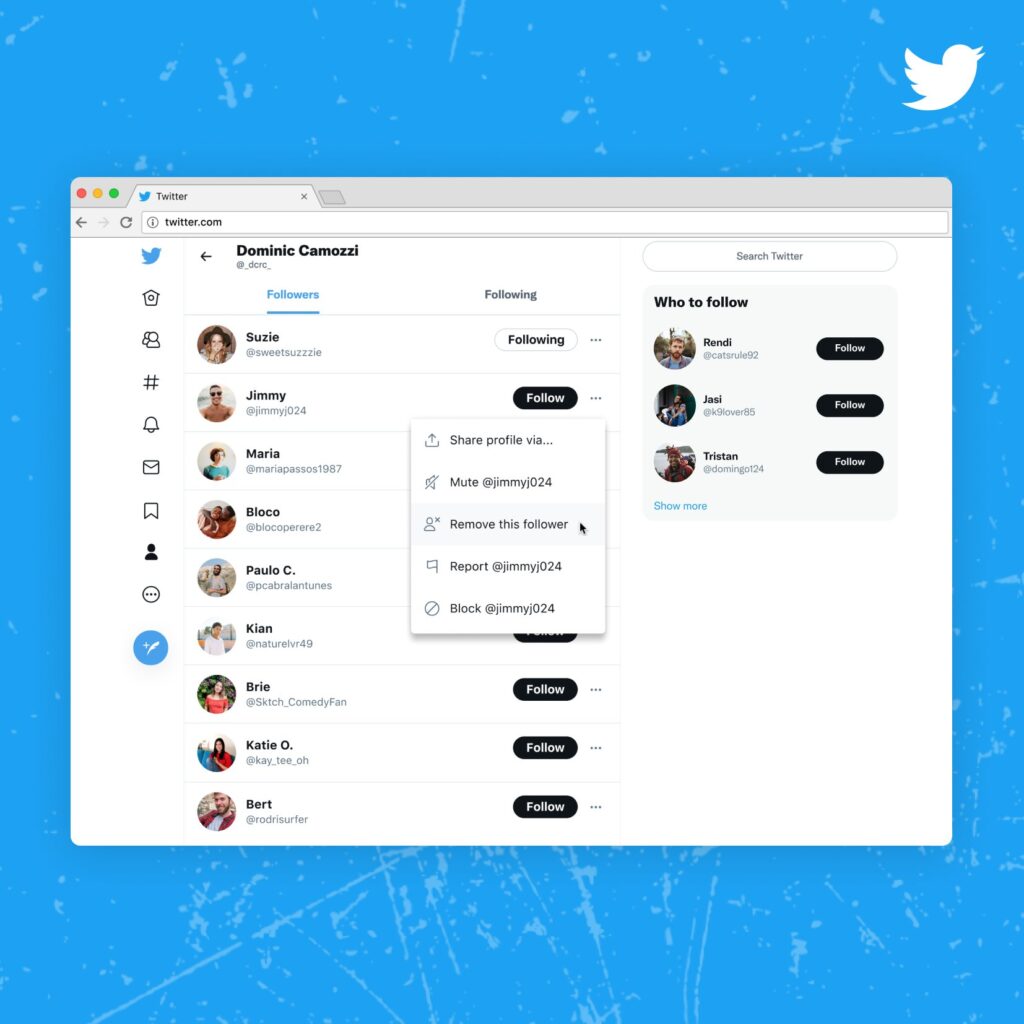
As part of the company’s effort to filter potentially offensive content and users from its platform, Twitter has officially launched its “soft block” feature that lets you remove troublesome followers. The feature was already being tested last month but is now being rolled out to the general public.

If you’re wondering how soft blocking is different from regular blocking, it actually doesn’t block users at all, but rather quietly makes the unwanted follower “unfollow” you. Twitter says that such users won’t be notified of the action taken on them.


Keep in mind that while you’re essentially removing yourself from their feed, they’ll still have access to your profile and your public tweets. Moreover, they can still follow you back if they realise they’ve been removed. This might be useful if you think that blocking someone just for being annoying is a bit extreme but of course, Twitter still recommends you to do so for harassers.

To use this feature, you can go to your Followers list, pick an account, click on the three-dot icon, and click “Remove this follower”. The social media giant says that this is only going to be available for web users for now, with no word on when it will come to iOS or Android apps.

Twitter has been developing a suite of features to increase safety and reduce toxicity on its feeds. One of them includes the ability to set who can reply even after a Tweet has been published. Another that’s being tested is an algorithm that automatically blocks users for you if it detects that they’re repeatedly posting offensive replies.

Tuesday, October 5, 2021

Canon’s Latest Dual Fisheye Lens Lets You Shoot VR Compatible Videos

Canon’s latest product announcement has caught most people off-guard. Instead of a new camera or a traditional lens, its newly revealed product is a dual fisheye lens that allows you to shoot content specially viewed on VR or AR headsets.

Known as the RF5.2mm F2.8 L Dual Fisheye, the new lens is designed to be used together with Canon’s high-end mirrorless cameras such as the EOS R5 – taking advantage of their large CMOS sensors to capture and deliver high quality content. Undeniably, its design may seem unusual for most users – featuring two bulging fisheye lenses on a flat surface that is attached to an RF mount connector. When attached to a compatible EOS camera, it does give you an impression that your camera either has a new pair of eyes or, amusingly, a snout.

But as bizarre as it looks, the whole point of its design is to enable your camera to capture up to 190-degree stereoscopic high resolution 3D footage or photos, while at the same time giving them a perception of depth. Other than that, Canon says it features coatings to control flare and ghosting, a F.28 to F16 aperture range, as well as dust and water resistant sealing.

Oh, and the Dual Fisheye is manual-only, by the way. Much like most lenses, it features a ring that adjusts the focus on both lenses simultaneously. There’s also an Allen screw adjustment that enables you to calibrate the focus on one lens if required.

Canon also announced a forthcoming firmware update for compatible cameras which would enable them to support the lens and the company’s new EOS VR system. Included in the update are new features such as MF (manual focus) peaking and Magic Window UI that aids users to customise their footage or photos for different types of VR/AR headsets.

Concurrently, new EOS VR Utility and EOS VR Plugin applications have also been introduced. These allow users to edit footage captured with the Dual Fisheye with a variety of tools for customising its resolution output and export format (DPX, Pro Res, H264, etc.). Last but not least, Canon will release an EOS VR plugin for Adobe Premiere as well.


The new Canon RF5.2mm F2.8 L Dual Fisheye is slated to be released in select markets in late December 2021 and will retail at US$1,999 (RM8,362). The company has yet to announce whether the lens will be making its way to Malaysia in the foreseeable future.

YouTube Will Let You Resume Unfinished Mobile Videos On Desktop

YouTube quietly launched a new feature that lets you resume watching videos from your phone to your desktop. “Continue watching” will appear in the form of a mini-player when you pause an unfinished video from your mobile app.

The mini-player will appear on the bottom right corner and will queue the video just a second or so before you paused on the mobile app. You can click the play button to continue watching in the shrunken view or click anywhere on the mini-player itself to expand and open up the video in full.

9to5google reports that the feature works for both Android and iOS, and is even effective when handing off from an Android TV to the desktop site. However, the continuity apparently only works one-way, as the mobile apps cannot resume videos from your computer.

For this to be enabled, both platforms must be logged into the same account in order for the history to be synced. YouTube seems to be trickling out the feature though, as only a handful of people have been able to access it. While you’re waiting for Continue Watching to be released in full, you’ll be happy to know that the premium background playback feature will be coming to all mobile users starting from November.

Thursday, August 5, 2021

Zoom Has Games You Can Play With Others In A Call

Conference calls are a daily reality for many who are now working from home. With Zoom being a commonly used software for that, it is now integrating a number of games that you can play with others in a call.

There are nine games in total for now, and they are all of the multiplayer kind. These range from LGN Poker, which should be self explanatory, to one called Heads Up! It’s been on iOS and Android for awhile, and is described as “charades with a twist”, and is apparently made by TV personality Ellen DeGeneres.


Zoom integrating games is quite the odd one. On one hand, it’s easy to imagine this being useful for those who sign into a call early. These games can then be used to kill time, and wait for the actual meeting to start, or while waiting for the late ones to show up. It can also be used for team building, if your boss is so inclined. But on the other, games by their very nature will usually drag on, derailing the meeting.

At any rate, the option to play games with others in a Zoom call is now available. Maybe you can just casually call up a bunch of friends to play them. But more than likely, if you have friends for that, you’ll probably be hitting up a proper multiplayer video game on Steam or something else.

Sunday, June 20, 2021

There’s A New Face Manipulation App That Transforms You Into A Pixar-Like Character

Meet the Voilà AI Artist Cartoon Photo app, which – as its ridiculously long name suggests – has the ability to transform your beautiful mug into a Pixar-like version of itself, among other things. And much like FaceApp, users are required to upload a photo of themselves (or others) via the software in order to be enhanced by developer Wemagine.AI’s cloud-based artificial intelligence system.

Aside from producing a photo worthy of an audition for the next Disney 3D animated movie, other styles featured on Voilà include hand-drawn caricatures, renaissance-esque portraits, and more. There are some limitations in play, however. As noted by the developer, the app (or its AI system, rather) is unable to process if more than one individual is detected in an image, and it also does not recognise photos of animals either. So if you’re hoping to transform your golden retriever into something similar to Dug from Disney’s Up, then you’re out of luck.

Like most apps out there, Voilà is free for everyone via Google Play Store and Apple App Store – at least, on the exterior. So what’s the catch? Again, much like FaceApp, expect the usual ad pop-ups, watermarked images and certain features locked behind a paywall. According to Wemagine.AI, the app’s “Pro” subscription fee is offered in three different options: US$ 3 for weekly, US$ 6 for monthly, and US$ 30 for yearly. As you’d expect, subscribing will grant you an ad-free experience, as well as removing the other non-premium limitations mentioned earlier.

In terms of privacy, Voilà and its developer noted in its policy that all data collected from the user is intended to provide and improve its service. In greater detail, Wemagine.AI explained that the app will access your device’s camera when activated, only retrieve uploaded photos for enhancements, and would not access your device’s photo albums. It also stated that it may collect certain information such as your IP address, browser type and version, and unique identifiers, device information, and purchase history only for analytical purposes. The developer also notes that it will comply with the user’s Do Not Track request by not collecting Advertising IDs or plant cookies.

Such privacy concerns had previously landed the app’s closest rival FaceApp in hot water. This was due to the fact that it also used cloud-based processing for image enhancements rather than featuring an on-device system. Furthermore, its developer, a Russian-based firm known as Wireless Labs, was alleged by the US government of sharing user information with its country’s authorities – something which the developer continued to deny due to the lack of evidence. That being said, Wemagine.AI told FOX Carolina that it is based in Canada, with small teams that work remotely and is scattered across the globe.

As mentioned earlier, Voilà is now available for both Android and iOS users globally. So if you happen to be looking for something that is currently unique and trendy to pass the time with, then this app may be it.

Saturday, June 19, 2021

Twitter May Let You Untag Yourself From Tweet Mentions


Last year, Twitter rolled out a feature that limits who can reply to your tweets. Now, the social media platform has announced the ability for you to untag yourself by tweet mentions. This is another feature that lets you control who you interact with.

Though it’s not one that’s out just yet. It’s part of a small list of early concepts being introduced by Dominic Camozzi, a Twitter product designer. In a string of tweets, he described what they would be like, and is asking users for feedback.

Basically, when they do roll out, one of the features will allow you to unmention yourself from tweets. And if you do this with someone who mentions you but isn’t followed by you, that person will not be able to mention you again.


More settings as part of this feature will also restrict certain accounts from mentioning you. You can also stop everyone mentioning you for a day, three days, or even a whole week.

Camozzi did not say when any of this will go live, or if they even will. If feedback to these ideas are warmly received, then maybe Twitter will start putting these ideas into development.

Wednesday, June 16, 2021

You Need Wired Headphones To Listen To Lossless Audio On Apple Music


Last night, Apple had announced that the Lossless Audio option will be rolled out to Apple Music alongside Spatial Audio with Dolby Atmos next month. These new features will be provided at no extra cost to subscribers but if you are already looking forward to listening to your favourite song with the new hi-fidelity setting through the service, then you also may have to invest in new headphones.

This is because you need a wired headphone in order to do that. In the age where wireless headphones and true wireless earbuds including Apple’s own AirPods series have become so popular among consumers, this limitation may seem rather irritating.

However, the reason behind this limitation is fairly rudimentary. CD-quality audio has a bitrate of 1411kbps and while Bluetooth has a transmission ceiling rate of around 2000kbps, the actual transmission speed that users are able to get in real life is far lower due to interferences as well as distance between devices.


There are indeed some hi-res audio codecs out there that have been optimised for Bluetooth transmissions such as Qualcomm aptX HD and Sony LDAC but even then, their bitrate is still nowhere close to CD-quality audio. As a comparison, aptX HD goes up to 576kbps while LDAC maxed out at 990kbps.

On another hand, Apple has yet to come out with such codecs itself. Furthermore, Apple Music’s Lossless Audio files will be encoded in Apple Lossless Audio Codec (ALAC) which is not supported even by the company’s highest-end wireless headphones, the AirPods Max.


Even though AirPods Max can be used as a wired headphone, it will still not be able to support Apple Music’s new Lossless Audio option. In terms of codecs, the headphone, as well as AirPods Pro, are limited to AAC, in addition to SBC which comes as a standard on any Bluetooth audio device.

Of course, we have also mentioned last night that users who want to push the playback quality even further via the Hi-Res Lossless Audio option need to use external devices such as a USB digital-to-analogue converter in order to make that happen.


As for the Spatial Audio with Dolby Atmos, it turns out you can listen to Atmos tracks with any given headphones. Just choose the Always On option in the Apple Music’s Settings and you will be good to go.

Wednesday, May 12, 2021

Twitter Will Warn You Before You Tweet Anything Potentially Offensive

Among the big three social media platforms, Twitter is frequently seen as the meanest of the lot – filled with hate speech, trolling, profanity, political rage, and more. Twitter itself seems to taken notice and is now rolling out a feature that encourages people to pause before they send something potentially harmful or offensive.

The social media company said it had already been testing the feature last year. After incorporating user feedback and learnings from the tests, Twitter is now launching the feature across iOS and Android, beginning with accounts that have set their language to English.

The feature has apparently gone through quite a bit of improvement. In earlier forms, Twitter said it struggled to capture the nuance in many conversations and frequently couldn’t differentiate between potentially offensive language, sarcasm, and friendly banter. This meant quite a few unnecessary prompts.


So the company made a few adjustments. This includes ensuring that the system takes into account the relationship between the author and replier. So if two accounts follow each other and often reply to each other, there’s a good chance that the language used probably isn’t an issue.

From the tests, Twitter found that the prompts had some moderating effect on what is actually said. If prompted, one-third (34%) of users would revise their initial reply or decide not to send the reply at all. And after being prompted once, people wrote, on average, 11% fewer offensive replies in the future.

Friday, May 7, 2021

Twitter Will Warn You Before You Tweet Anything Potentially Offensive

Among the big three social media platforms, Twitter is frequently seen as the meanest of the lot – filled with hate speech, trolling, profanity, political rage, and more. Twitter itself seems to taken notice and is now rolling out a feature that encourages people to pause before they send something potentially harmful or offensive.

The social media company said it had already been testing the feature last year. After incorporating user feedback and learnings from the tests, Twitter is now launching the feature across iOS and Android, beginning with accounts that have set their language to English.

The feature has apparently gone through quite a bit of improvement. In earlier forms, Twitter said it struggled to capture the nuance in many conversations and frequently couldn’t differentiate between potentially offensive language, sarcasm, and friendly banter. This meant quite a few unnecessary prompts.


So the company made a few adjustments. This includes ensuring that the system takes into account the relationship between the author and replier. So if two accounts follow each other and often reply to each other, there’s a good chance that the language used probably isn’t an issue.

From the tests, Twitter found that the prompts had some moderating effect on what is actually said. If prompted, one-third (34%) of users would revise their initial reply or decide not to send the reply at all. And after being prompted once, people wrote, on average, 11% fewer offensive replies in the future.

Sunday, May 2, 2021

Google Earth’s New Timelapse Feature Allows You To Watch As Malaysian Cities Grow, Change

Google Earth has a nifty new feature called “Timelapse” that can give you a bird’s eye view (or really, a satellite’s eye view) of cities and other places as they change across time.

The tech giant calls it the biggest update to Google Earth since 2017, incorporating 20 million satellite photos from the last 37 years. So you just type in a place you want to see (say “Kuala Lumpur” or “Johor Bahru”) and you can watch it change across nearly four decades.

It’s pretty cool, we have to admit – especially when applied to a city or town that you’ve grown up in. To begin, you can simply click here and use the search bar to find the place you want to see.

For example, here’s a view of Kuala Lumpur from 1984 to 2020.


If you prefer a more guided tour, you can open Google Earth and click on the ship’s wheel to find Timelapse in Google Earth’s storytelling platform, Voyager. While there, you can click on “Warming Planet”, for example, and watch the melting of an Alaskan glacier as the years pass – a worrying reminder of climate change.

Google has also helpfully uploaded a whole bunch of timelapse videos on this webpage and on YouTube. You’ll find videos of Kuala Lumpur, Johor Bahru, and Segamat along with predictable inclusions like New York and London.

Wednesday, April 28, 2021

Facebook Now Allows You To Transfer Your Posts To Other Platforms


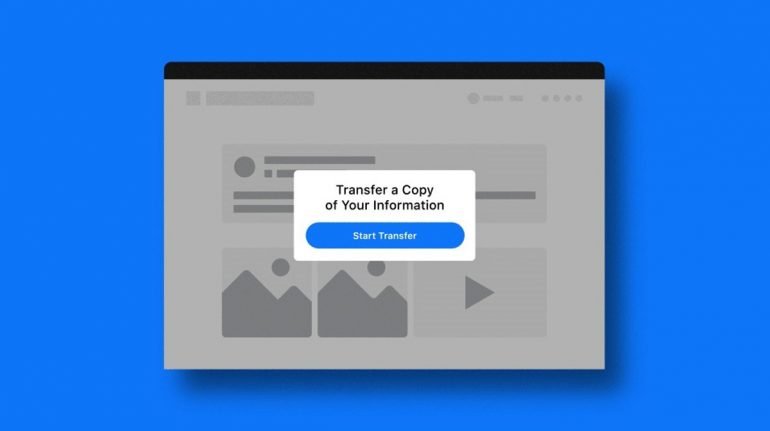
Facebook today revealed that it has rolled out a new feature which would allow its users to preserve their published posts to platforms outside of its ecosystem such as Google Docs, WordPress or Blogger. This greatly expands the existing data transfer tool for photos and videos that was introduced by the social media company last year.

The new feature is part of a cross-company data-sharing initiative that launched in 2018, simply known as the Data Transfer Project. Its aim is to have users freely move their data across various online services and platforms seamlessly without restriction. Among those participating in this initiative includes Apple, Google, Microsoft and Twitter – all of which also have introduced their own data-export tools.


Concurrently, as noted by The Verge, the introduction of this new feature would also help bring Facebook in line with two recent regulation laws, the California’s Consumer Privacy Act and the European Union’s General Data Protection Regulation. “We hope this tool empowers people to take control of their data and encourages the creation of updated rules around data portability by lawmakers,” said company Chief Privacy Officer Michel Protti. “We look forward to working with more experts and companies to expand the scope of what you can move between platforms.”


This new addition to Facebook’s information transfer tool is now available to all users across the globe. Those who wish to utilise the feature may find it in the “Your Facebook Information” page, under the platform’s Settings page. From there, you can choose which type of content you wish to transfer, and to which platform outside of Facebook that you want it delivered to.

Keep in mind that the choices of transfer destinations will differ depending on what type of content you wish to move. Also, it’s worth noting that any data ported to other platforms will not include elements such as comments or data from other users, as they belong to their respective owners.

Tuesday, April 20, 2021

You Can Now Check Your Vaccination Appointment Status Directly On JKJAV’s Website


As previously announced by the authorities, Phase 2 of the National COVID-19 Immunisation Programme (NCIP) will kick off tomorrow, 19 April 2021. With the aim to immunise 9.4 million people, this particular phase is focusing on senior citizens, people with disabilities, and those that have chronic diseases.

Since earlier this month, the national contact tracing app, MySejahtera has begun notifying users of the details for their vaccination appointment which include the date, time, and location of the Vaccine Administration Centre (VAC). In case you have forgotten your appointment date, you can always return to the app to check them out.

Alternatively, you could use this online tool that the Special Committee On COVID-19 Vaccine Supply (JKJAV’s) has recently implemented on its website. All you need to do is just input your MyKad or passport ID as well as phone number and once you solve the captcha, you are then able to check out the details of your vaccination session:


As pointed out earlier, you don’t have much to be worried about if you are using MySejahtera as information in the status check should ultimately match what has been stated inside the app. What’s more important is that you get yourself registered for the vaccine and keep a look out for MySejahtera’s notification or SMS in which you then have 48 hours to accept your vaccination session:


If you are not a MySejahtera user, you can also register for the vaccine manually via JKJAV’s official website or call the NCIP’s hotline at 1800-888-828. The NCIP has been scheduled to take place until February 2022 but nevertheless, we do recommend registering yourself for the vaccine as soon as possible.

PS5 Update Lets You Store Games On External USB Drives


The PS5 has had an update or two since launch, but they were on the smaller side of things. Now, Sony Interactive Entertainment has released what it calls the console’s first major update. And this one lets you store games on external USB drives.

That being said, the limitations of external storage remains, that is you can’t play PS5 games from them. You’ll still have to move them to the internal SSD for that. This is definitely a faster process than having to download them. That being said, you’ll have to be careful about chewing through its total read/write life cycle.

Other things being added in this update include features that extend across two console generations. For one, there’s cross-generation Share Play. This means you can let a friend try out your PS5 game on their PS4, and vice versa. Then there’s the Request to Join Game Session option. This allows others to join in your game without you sending out the invite yourself, and you just need to approve their request.


The PS5 is also getting more personalisation options with this update. This includes things like shortcuts to disabling in-game voice chat and adjusting the volumes of individual voice chats. A more interesting one is what SIE calls Game Update Pre-download. It basically allows you to download updates early, if it’s enabled by a game’s dev team.

The PlayStation blog post also mentions new features coming to the PS app in the future, including joining a PS5 game via the app. For a more detailed breakdown of each feature, you can tread them yourself.

Sunday, April 18, 2021

Facebook Data Leak: How To Check If You Were Affected


Last weekend, a set of databases that contain personal data from 533 million Facebook users was listed on a well-known data marketplace. First reported by Alon Gal, the Co-Founder and CTO of a cybersecurity company called Hudson Rock, around 11.6 million of those users were from Malaysia.

If you are wondering whether your details are included in the leak or otherwise, you can now use the popular online tool Have I Been Pwned (HIBP) to verify it. In case you are not familiar with HIBP, it was launched in December 2013 and is the brainchild of Australian cybersecurity expert Troy Hunt.

For Malaysians, they may remember that Troy had added the Jobstreet database into HIBP after the massive national-scale data breach of 2017. In the case of Facebook though, you can verify the involvement of your personal data by providing your phone number to HIBP’s search engine as each of the records within the leaked database contained a phone number.

Do note that you need to include the country code in your phone number to perform the search. As an example, if your phone number is 012-3456789, the search term that you should use would be 6012345789.

If your phone number is part of the leak, the result would be shown as per the image above. Else, it would look like this:


Meanwhile, Facebook stated that last weekend’s leaked database was not an actual “leak”. Instead, it was the result of data scraping performed by an undisclosed malicious party in 2019 which was made possible due to a security issue that has since been patched by the platform.

Regardless of that, users are facing the risk of being phished or scammed since their Facebook’s personal data is now out there in the open. Hence, we would like to once again remind you to take the necessary action to protect yourself against such attempts.

Xiaomi Shows Off Physical Concept Of Vision Gran Turismo

At the very tail end of last month, Xiaomi unveiled the Vision Gran Turismo. The car was revealed as a digital hypercar, and one that’s made...